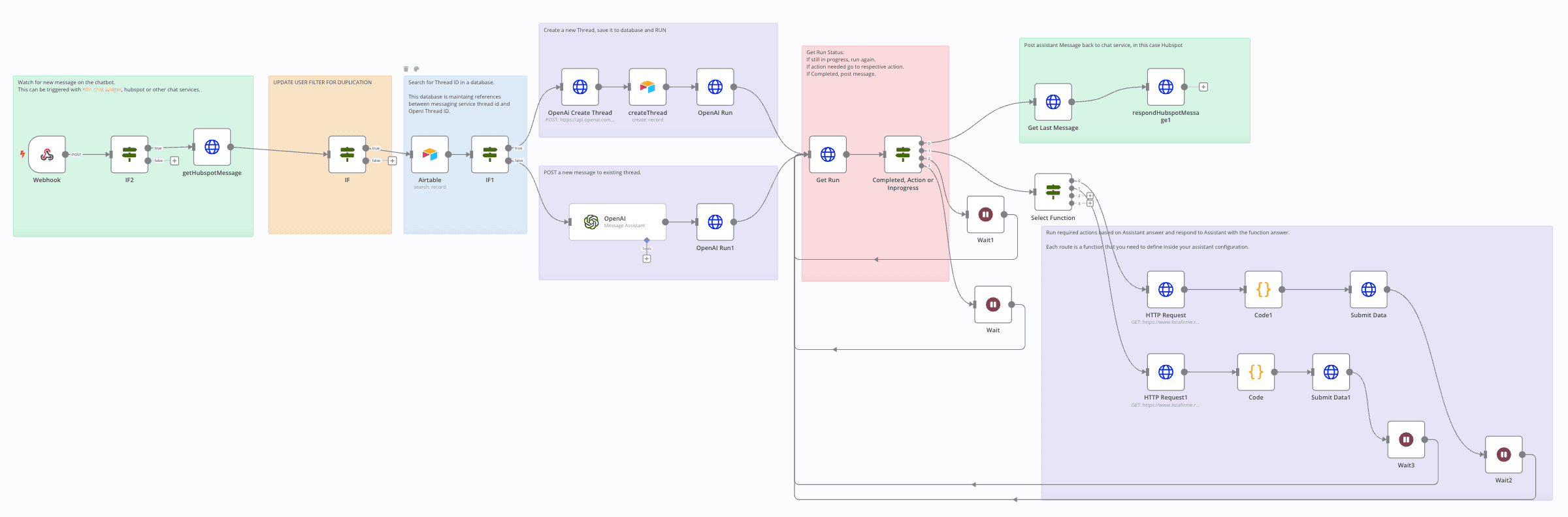


This workflow will allow you to use OpenAI Assistant API together with a chatting platform. This version is configured to work with Hubspot, however, the Hubspot modules can be replaced by other platform and it will work similarly.
Prerequisites:
- Create a Hubspot Chat (Live chat available on free plan) or Chatflow (paid hubspot only) and configure it to send all replies toward an n8n webhook (you need to create a custom app for that. I will create a separate article on how to do it, meanwhile, feel free to message me if you need support.
Setup:
- Create a OpenAI Assistant, define its functionality and functions
- Update the Hubspot modules with the Hubspot API Key
- Update the OpenAI modules with OpenAI API Key
- Create an Airtable or any other database where you keep a reference between the thread id in Hubspot and Assistant API
If you need help deploying this solution don't hesitate to email me or schedule a call here.